Colorize (setting)
 The
setting Colorize define the colorizing of a particular graphical object.
The
setting Colorize define the colorizing of a particular graphical object.
 The
setting can have one of the three distinct states:
The
setting can have one of the three distinct states:
| Checked | Colour table | Colorizing follows the currently selected Colour table (or element's properties in model view) |
| Partly checked | Dark | The object is coloured with some dark (nearly black) colour |
| Unchecked | Bright | The object is coloured with some bright (nearly white) colour |
The setting is available to following evaluations :
- Outline
- Model and Model Slices
- Surface and Surface Edges and Surface Slice Edges
- Slice X, Slice Y and Slice Z
- Isolines (Isotherms)
- Isosurface
- Streamlines
- Vectors (HedgeHog, Arrows)
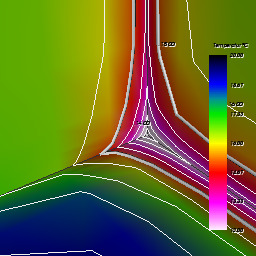
Example: An interesting ability exists when willing to show white isolines over colorized (by value) component's surface, while emphasizing component's edges in black.
See also: Evaluations, Results 3D window, Active (setting), Solid (setting), More Light, Colorbar (control panel), Colour scale / Colour tables, Fixed Range (setting)