Rotate window
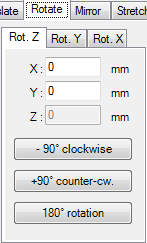 The window Rotate allows rotations of one or more
element(s) selected from
element list.
The window is opened from the
context menu of element
processing (submenu Rotate).
The window Rotate allows rotations of one or more
element(s) selected from
element list.
The window is opened from the
context menu of element
processing (submenu Rotate).
|

The rotation is applied equally to all elements currently selected in the element list. If there are no elements selected all Rotation buttons are set inactive.
Remark: Rotation in Y or X plane is available only in 3D projects.
Remark: Element rotation are done only in 90 degrees steps to keep the orthogonal structure of the input model.
Remark. To rotate elements of belonging together it is advised to assign them to a group. This allows for later selection from context menu of element processing by group name easily.
Remark. The newly introduced function Slope/Roundness of AnTherm Version 8 permits rotation by an arbitary angle between 0 and 90 degrees (not only integral multiples of 90 degrees). With this method, the element that is to be rotated is subdivided into several smaller elements. This means that in contrast to the rotation method described here, the function Slope/Roundness has an impact on the number of the elements of the model.
See also: Element Editor, Context menu of element processing, Element selection window, Translate window, Stretch window
, Slope/Roundness